Break Punching
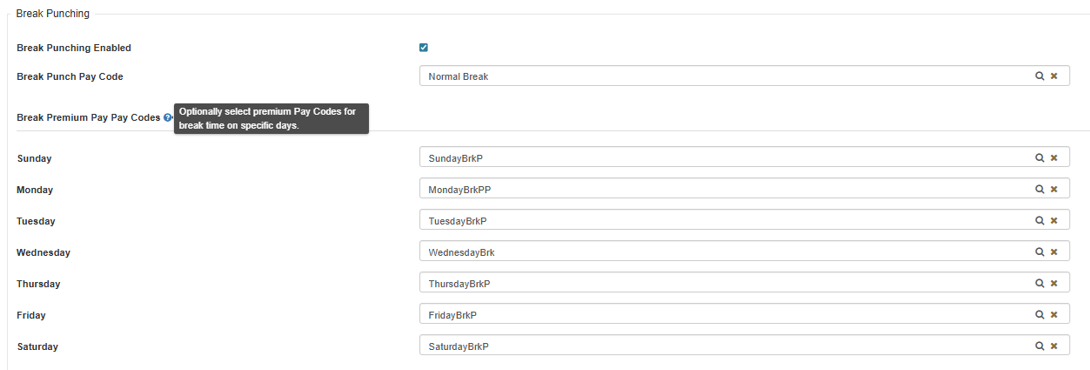
Break Punching allows Employees to record break start and end times using dedicated pay codes. This feature is configured in Pay Policy Maintenance and requires unique Pay Codes to correctly identify break punches and, optionally, Break Premium Pay.
Configuration Steps
-
Enable Break Punching
In the Punch Options Tab located within the Pay Policy Maintenance, enable Break Punching and configure the Break Punch Pay Code and optional Break Premium Pay Pay Codes. -
Configure Break Punching Related Options
-
Break Punch Pay Code: Required for recording Break Punches.
-
Break Premium Pay Code(s): Optional. Can be set up for specific days of the week or at the Shift level within the Shift Maintenance.
-
Important: Do not reuse Pay Codes already assigned to other purposes in the system. Break Punch logic identifies break entries based on Pay Codes, so unique codes are required.
-
-
Break Start Process
When an Employee starts a break process:Close the existing open line:
The current active Timesheet line will be ended at the break start time.
Example: If an Employee clocks in at 8:00 AM and selects Break Start at 11:00 AM, the Timesheet will display:
A line from 8:00 AM to 11:00 AM (end of shift segment).
A new line starting at 11:00 AM with no out time (the out time will be set during the Break End process).
If no break line exists:
The system will create an in punch on the Timesheet using the configured Break Punch Pay Code or Break Punch Premium Pay Pay Code.
At Break End:
Upon selecting Break End, the system will:End the existing break line.
If no break line exists, create a complete break line and immediately end it.
Create a REG punch with the same timestamp as the break end.
-
Break End Process
When an Employee Ends a break process:If an existing break line was created by the last punch (Break Start) and there is an in with no out, the punch made as part of the Break End punch will be added as the out and end the break.
If no break line exists, the system will create a full break line and end it immediately.
The system will also create a new REG punch with the same timestamp as the break end.